Tampilkan postingan dengan label Review. Tampilkan semua postingan

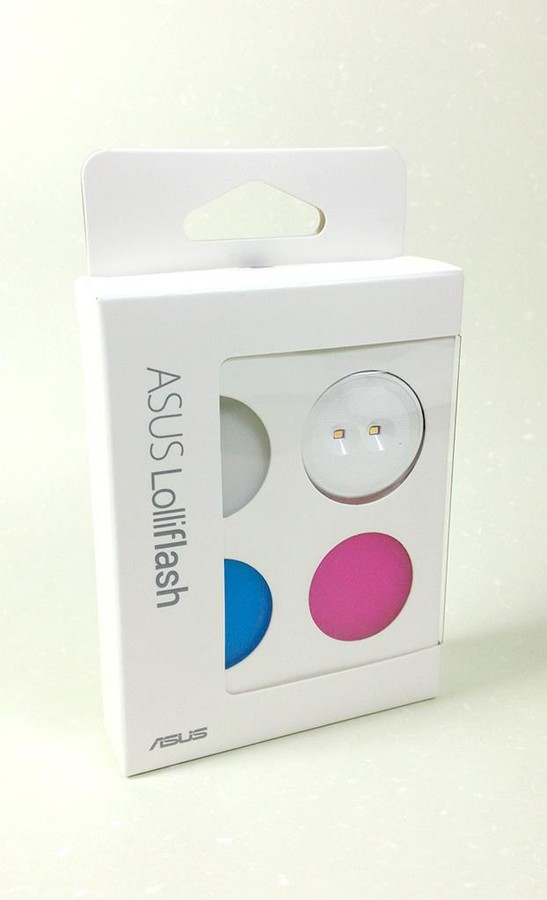
ASUS LolliFlash Unboxing and Review


It's a simple enough proposition. You charge the thing up over USB, then turn it on to one of the three settings and leave it plugged in to the headphone jack of your Zenfone. (Or any other phone, we suppose.) If you really want to get saucy there are a few color filters you can apply. Then just snap away.

The ASUS Lolliflash will be available for $14.99.

ASUS LolliFlash Specifications: 


ASUS LolliFlash Specifications
Dimensions 31.5mm x 11mm
Weight 8g
Battery Lithium battery
Color white, red, blue, black, yellow
Port Micro USB (charging only)
Battery Life about 20 minutes
Input voltage and current 5.0V, 0.12A
Beam angle about 95 °
CRI 80 (CRI)
Color Temperature ±2700K, ±500K, ±5000K , ±500K
Brightness change 3 (low, medium, high)

ASUS LolliFlash:


Photos taken with LolliFlash:

Without LolliFlash
With LolliFlash
With LolliFlash Red Filter
No Flash
With LolliFlash low setting
With LolliFlash Medium setting
With LolliFlash High setting

Fast Charging: Asus Zenfone 2 Boostmaster vs Oppo Find 7 VOOC vs LG G3


ZenFone 2 built-in 3000mAh capacity battery, if with fast charge charger, charge 39 minutes up to 60% of capacity.
Zenfone 2 BoostMaster Technology Against Competitors

ASUS Zenfone 2 Boostmaster


From the image above:


ASUS Zenfone 2 Fast Charging Review
www.asus-zenfone.com
No. Battery Level Time Charging Time
1 8% 2:41 Start
2 41% 3:04 23 Minutes
3 62% 3:19 38 Minutes
4 79% 3:30 49 Minutes
5 86% 3:40 59 Minutes
6 99% 3:56 1 Hour 15 Minutes
7 100% 4:00 1 Hour 19 Minutes

Oppo Find 7 VOOC Rapid Charging

From the image above:

1 Hour 6 Minutes from 13% to 100%

LG G3 Charging time


From the image above:

2 Hours 5 Minutes from 12% to 100%

Asus Zenfone 2 USB OTG Test


USB On-The-Go, often abbreviated to USB OTG or just OTG, is a specification first used in late 2001, that allows USB devices such as digital audio players or mobile phones to act as a host, allowing other USB devices like a USB flash drive, digital camera, mouse, or keyboard to be attached to them.

Asus Zenfone 2 Support USB OTG, but the power is very low (Arround 0.3 A). And to perform USB OTG your Flash drive/External Hard disk must be NTFS format. To perform USB OTG you must have OTG Cable which not included inside Zenfone 2 box.

microUSB Power Test


Read Flash drive via OTG

When open Flash drive with USB OTG, Zenfone 2 can do it without additional power. To open Flash drive go to File Manager and select USBDisk. To eject Flash drive, go to Settings>Storage>Eject USB Disk


Read External Hard disk with OTG


 To read External Hard disk with OTG, Zenfone 2 need additional power (charger/power bank) and Y-OTG cable.

Asus Zenfone 2 Gaming Experience


Post a video about Zenfone 2 Playing some games, Cytus, Asphalt8, GT Racing2.

Asus Zenfone 2 vs Samsung Galaxy S6 Camera Comparison


Samsung Galaxy S6 vs Asus ZenFone 2 camera comparison test. Remember last week ZenFone 2 press conference announcing that many people for Asus released the official newsletter of them mentioned ZenFone 2 camera is the best. Asus officially took out with Apple, HTC, LG , Samsung, Sony backlit film for comparison's flagship models and general shooting imaging, it seems ZenFone 2 easily defeated all rivals.

Zenfone 2 HDR vs rivals at Zenfone 2 Experience
Zenfone 2 Backlight Photography vs Rivals
Yesterday eprice.com.tw make camera comparison test between Samsung Galaxy S6 vs Asus Zenfone 2 (4GB RAM), The firmware of Samsung Galaxy S6 and Asus Zenfone 2 that used in the test:


Samsung Galaxy S6 run Android 5.0.2 and Zenfone 2 run Android 5.0

Main Lens comparison

First you have to share with you that our phones are open to both the highest pixel as the test standards, including Galaxy S6 highest pixels for 16 MP, a ratio of 16: 9; and ZenFone 2 highest pixel is 13 MP, a ratio of 4 : 3, so the image will be proportional to the difference. While the general scenes, the two phones are turned off HDR function, only in backlit scenes, before the HDR mode is turned on.  As part of the night shoot, Galaxy S6 no night mode, so we turn to automatic and do HDR shooting modes; As ZenFone 2 in addition to the automatic mode, also has a night shot mode with low light, low light mode which will automatically shrink To 3MP, so when the proportion of original cut would be more different. 

the following are all real shot thumbnail image on the top, we can point to open to zoom in to view the original image; as for the bottom is the original cut of focus, so that we can look at the actual quality of the performance of individual handsets. 

General Scene 1

Samsung Galaxy S6 :

Samsung Galaxy S6
Samsung Galaxy S6 focus crop
Asus Zenfone 2 :

Asus Zenfone 2
Asus Zenfone 2 Focus Crop

General Scene 2

Samsung Galaxy S6 :
Samsung Galaxy S6
Samsung Galaxy S6 crop focus
Asus Zenfone 2 :
Asus Zenfone 2
 
Asus Zenfone 2 crop focus

HDR Backlight Scene

Samsung Galaxy S6 :
Samsung Galaxy S6
Samsung Galaxy S6 crop
Asus Zenfone 2 :
ASUS Zenfone 2
Asus Zenfone 2 Crop

Close up Scene

Samsung Galaxy S6 :
Samsung Galaxy S6
Samsung Galaxy S6 zoom and crop
Asus Zenfone 2 :

Asus Zenfone 2
Asus Zenfone 2 zoom and crop

Night Shoot Scene

Samsung Galaxy S6:
Samsung galaxy S6
Samsung Galaxy S6 crop
Asus Zenfone 2 :
Asus Zenfone 2
Asus Zenfone 2 Crop
Asus Zenfone 2 Low Light Mode (3 MP)
Asus Zenfone 2 Low Light Mode

Credit and Source

Asus Zenfone 2 ZE551ML Battery Endurance Test


ZenFone 2 built-in 3000mAh capacity battery, if with fast charge charger, charge 39 minutes up to 60% of capacity. Asus Zenfone Blog will give you some reference about ASUS Zenfone 2 Battery Performance (ZE551ML 1.8GHz/2GB RAM)

Phone Model: FullHD Z00AD/ZE551ML/2GB/32GB

Test 1

Play Video using MX Player
Volume: 20
Brightness: 50%
Video: MPEG4 Video (H264) 1920x800 23.976fps [V: English [eng] (h264 high L4.1, yuv420p, 1920x800) [default]] Audio: DTS 48000Hz 6ch 1536kbps [A: English [eng] (dts, 48000 Hz, 5.1, 1536 kb / s) [default]]

Result:
13:52 - 16:10 100% ~ 75% About 2 hours 20 minutes 25% power 1 hour approximately 10.7% 

Battery Monitor Screenshots:


Test 2

unused standby power saving actions to keep the Internet


Result: 00:48 - 09:56 60% to 56% 9 hours power consumption of about 4%

Screenshots:


Test 3


standby no WIFI no network no power-saving mode
Conclusion: 8 hours Standby decline 0% 

Screenshots:


Older Post ►
 

Copyright 2011 asus x zenfone is proudly powered by blogger.com